Introduction: “The Screen Turns On” Does Not Always Mean It Is Compatible
For overseas mobile phone parts wholesalers, repair chains, and regional distributors, screens are often one of the most frequently purchased and technically sensitive products in inventory. They are available in a wide range of models, versions, display technologies, and quality grades. A product may look correct and even light up during a quick test, yet still be unsuitable for the customer’s phone.
Common problems after installation include:
• The screen does not turn on, or the touch function does not work.
• The display works, but touch response is inaccurate or intermittent.
• The screen size appears identical, but the assembly does not fit correctly.
• The display shows flickering, a green screen, a white screen, image distortion, or abnormal brightness.
• The same commercial phone name has different regional, network, or production versions that are not interchangeable.
• The flex cable looks similar but has a different pin definition, length, or position.
• The screen works temporarily but does not support functions such as automatic brightness, sleep/wake, fingerprint recognition, or other model-specific features.
In many cases, the issue is not simply “poor screen quality.” It is a mismatch between the phone model, regional version, display technology, touch solution, flex cable, or motherboard configuration. For bulk buyers, establishing a reliable compatibility-checking process is therefore more important than comparing unit prices alone.
This article explains how to verify phone models and versions, inspect screen flex cables, distinguish display technologies, test samples, and manage bulk orders. The goal is to help overseas buyers reduce mismatch-related returns, control after-sales costs, and build a healthier mobile phone parts business.
1. What Factors Affect Mobile Phone Screen Compatibility?
1.1 The Brand and Series Name Are Not Enough
Descriptions such as “iPhone 11 screen,” “Samsung A-series screen,” or “Xiaomi screen” may be useful during an initial inquiry, but they are usually not precise enough for a formal purchase order. A single product family may contain several sub-models, regional versions, or revised versions with similar appearances but different internal structures.
Before placing an order, buyers should confirm at least the following information:
• Brand name;
• Commercial model and series;
• Complete model code;
• Regional or network version;
• Product generation or release year;
• Screen size and display technology;
• Model information printed on the original screen or flex cable;
• The motherboard version for which the screen is intended.
For bulk orders, do not rely only on a customer’s verbal description or a product image. It is better to request the complete model code, photos of the original screen, close-up photos of the flex cable, and a screenshot of the phone’s system information. These records can then be used as the basis for quotations, sample testing, and shipment verification.
1.2 The Same Phone Name May Cover Different Versions
Manufacturers often release different versions of a phone for different markets. These may include:
• Chinese, international, European, North American, and other regional versions;
• Single-SIM and dual-SIM versions;
• 4G and 5G versions;
• Versions using different processor platforms;
• Different memory or motherboard configurations;
• Standard, Pro, Plus, Max, and Ultra versions;
• Different production batches or repair-replacement versions.
These versions may use different motherboards, display drivers, touch-control chips, or flex-cable designs. Even when the screen size is the same, the screens may not be directly interchangeable.
During sourcing, avoid vague judgments such as “almost the same,” “universal for this size,” or “it looks identical.” Compatibility should be confirmed through the complete model code and actual installation testing.
1.3 LCD, OLED, and Other Display Technologies Are Not Automatically Interchangeable
Common mobile phone display technologies include LCD, OLED, and AMOLED. Different technologies can vary in:
• Screen thickness;
• Brightness and color performance;
• Power consumption;
• Connector and flex-cable design;
• Touch integration;
• Frame and assembly structure;
• Support for fingerprint recognition, always-on display, and other functions.
For the same phone model, the market may offer original pulled screens, refurbished original screens, flexible OLED screens, hard OLED screens, and LCD replacement screens. These products can differ significantly in price, visual performance, thickness, power consumption, and installation experience.
Buyers should first define their market positioning. Are the screens intended for high-end repair shops, general repair customers, or price-sensitive wholesale channels? The answer will determine which product grade is appropriate. A screen should not be evaluated only by whether it can light up.
1.4 The Flex Cable Is a Critical Compatibility Component
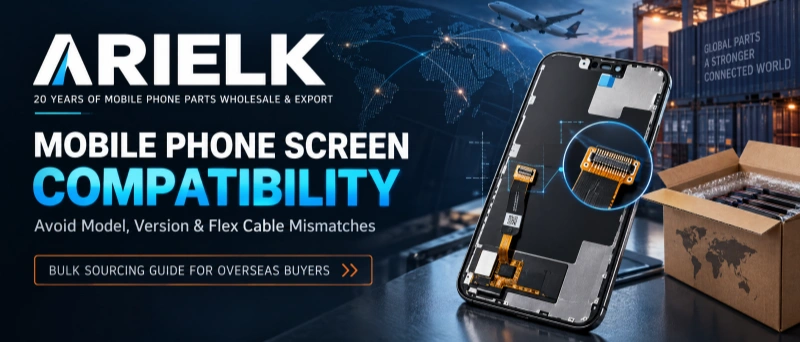
The screen flex cable connects the display and touch components to the phone’s motherboard. Flex-cable mismatch is one of the most common and easily overlooked causes of installation failure in bulk sourcing.
The following details should be checked carefully:
• Whether the connector shape is identical;
• Connector width, length, and position;
• Number and arrangement of gold contact points;
• Flex-cable routing and bending position;
• Whether the cable length suits the original phone structure;
• Whether display and touch cables use the same configuration;
• Whether an adapter flex cable or additional component is required;
• Model, version, or batch markings on the cable;
• Any creases, cracks, oxidation, or soldering abnormalities.
A visually similar connector does not necessarily have the same electrical definition. Forcing a cable into a connector, repeatedly inserting and removing it, or using an unverified adapter may damage the motherboard connector. When sourcing a new model for the first time, always test samples instead of confirming compatibility by appearance alone.
2. A Step-by-Step Compatibility Check Before Bulk Purchasing
Step 1: Collect Complete Model Information
Overseas buyers should prepare a clear model list before requesting quotations. Each model should include, whenever possible:
| Information | Recommended details |
| Brand | For example, Apple, Samsung, Xiaomi, and others |
| Series and commercial name | Specific series and version name |
| Complete model code | Code shown in device settings, on a label, or on the motherboard |
| Region or network version | Carrier, regional, 4G, 5G, and other relevant details |
| Original screen photos | Front, back, flex cable, connector, and label photos |
| Required product grade | Original pulled, refurbished, OLED, LCD, or another grade |
| Expected quantity | Sample quantity, first-order quantity, and monthly demand |
| Target market | Sales country, customer type, and repair positioning |
If the customer cannot provide a complete model code, request at least a screenshot of the phone’s model information and clear, high-resolution photos of the original screen flex cable. Any model that remains unconfirmed should be marked separately and should not be mixed with confirmed models.
Step 2: Verify the Complete Model Code in the Phone Settings
If the buyer has access to a complete handset, check the model information in the phone’s settings. Depending on the brand, it may appear under “About Phone,” “Device Information,” or “System Information.”
Do not record only the commercial product name. Also check:
• Whether the model code includes a regional suffix;
• Whether it is a carrier-customized version;
• Whether it is a Pro, Plus, or Ultra version;
• Whether there are multiple generations with similar names;
• Whether the phone is refurbished, re-housed, or fitted with a replacement motherboard.
In the repair market, a handset may have a replacement housing, so its appearance may no longer accurately indicate the original model. System and motherboard information are usually more reliable.
Step 3: Photograph and Compare the Original Screen Flex Cable
Ask the customer to provide clear photos taken under good lighting and with the camera properly focused. Recommended photos include:
1.A full front view of the screen;
2.A full back view of the screen;
3.A close-up of the flex cable;
4.A close-up of the connector and gold contacts;
5.Any model number, QR code, or text printed on the flex cable;
6.The screen frame, brackets, screw holes, and assembly structure.
When confirming compatibility, compare the original screen with the proposed replacement item point by point. Do not compare only the front appearance. Full-screen, curved, and bezel-less products often look very similar from the front, while the compatibility-defining differences are located on the back of the assembly.
Step 4: Confirm the Display Technology and Product Grade
The purchase order should clearly state the product grade. Terms such as “original,” “OEM,” or “high quality” may be interpreted differently by different suppliers and buyers. More precise descriptions include:
• Original pulled screen;
• Refurbished original screen;
• High-quality OLED replacement screen;
• Hard OLED replacement screen;
• LCD replacement screen;
• Screen assembly with frame;
• Screen assembly without frame;
• Screen with integrated touch component or screen without the touch component.
Also confirm what is included in the product:
• Screen assembly;
• Touch component;
• Earpiece mesh, brackets, or other small parts;
• Protective film;
• Installation adhesive or pre-applied adhesive;
• Adapter flex cable;
• Original parts that the repair technician must transfer.
The more precisely the product grade is defined, the easier it is to align quotations, inspection standards, and after-sales handling.
Step 5: Test Samples Before Confirming the Bulk Order
Sample testing should not be limited to checking whether the screen lights up. The test should simulate the actual repair process as closely as possible. At minimum, check:
• Power-on and display output;
• Full-screen image quality;
• White, black, and red/green/blue color screens;
• Brightness adjustment;
• Touch response across the full display;
• Multi-touch performance;
• Edge touch performance;
• Scrolling, typing, and dragging;
• Sleep and wake functions;
• Front camera, earpiece, and sensor areas;
• Frame, screw-hole, and overall assembly fit;
• Heat and stability after an extended test period.
If the model supports fingerprint recognition, automatic brightness, True Tone, face recognition, or other specific functions, confirm whether the replacement product supports them and whether calibration, data transfer, or original-part transfer is required.
3. Common Screen Mismatch Problems and How to Handle Them
Problem 1: The Commercial Model Name Is the Same, but the Version Is Different
Symptoms: The screen size and appearance seem correct, but the display does not turn on, touch does not work, or certain functions are missing.
Possible cause: Different regional, network, motherboard, or production versions use different display solutions or flex-cable definitions.
Recommended action: Verify the complete model code, compare the original flex cable and connector, inform the supplier of the target market and exact handset version, test samples before the first bulk order, and include the confirmed version in the purchase order and packing list.
Problem 2: One Phone Model Has Multiple Display Technologies
Symptoms: The screen displays an image, but brightness, color, thickness, touch response, or power consumption differs significantly from the original.
Possible cause: The buyer confirmed only the phone model and did not specify LCD, OLED, AMOLED, or the required replacement grade.
Recommended action: State the required display technology in the inquiry and purchase order, clarify acceptable differences in color and brightness, create separate product grades for premium and price-sensitive customers, and never present a lower-cost replacement solution as an original-grade product.
Problem 3: The Connector Looks Similar but Is Not Interchangeable
Symptoms: The screen does not turn on, touch does not work, or the motherboard connector is damaged after installation.
Possible cause: The connector has a similar shape but a different pin definition, power arrangement, or cable configuration.
Recommended action: Never force the connector into place. Confirm connector details through high-resolution photos, compare cable length and bending direction, check the cable markings, and ask an experienced technician to perform the first installation. If an adapter is required, confirm that the adapter solution has been tested in practice.
Problem 4: The Screen Is Electrically Compatible but Does Not Fit the Phone Structure
Symptoms: The screen displays correctly and touch works, but it lifts at the edges, experiences pressure, shows light leakage, or cannot be secured properly after installation.
Possible cause: Differences in the frame, brackets, screw holes, earpiece position, camera openings, or screen thickness.
Recommended action: Confirm whether the product is a screen with frame or without frame, inspect the frame and adhesive position before installation, compare all camera and sensor openings, verify screen thickness and assembly tolerances, and clarify whether pre-applied adhesive or a compatible bracket is required.
Problem 5: A Refurbished or Repaired Phone Causes Model Identification Errors
Symptoms: The handset looks like one model, but its motherboard, system information, or screen structure belongs to another version.
Possible cause: The device has been re-housed, fitted with a replacement motherboard, or repaired using components from another version.
Recommended action: Prioritize system and motherboard information, inspect the motherboard and original flex cable when necessary, do not order based only on housing color, camera layout, or screen size, and use a higher sample-validation ratio for devices sourced from complex repair markets.
4. How Overseas Wholesalers Can Reduce Screen Sourcing Risk
4.1 Manage SKUs Using Model, Version, and Product Grade
Do not use only the phone’s commercial name as the SKU. A more reliable internal SKU structure can include:
Brand/model code + region or version + display technology + product grade + with or without frame
This makes it easier to separate different regional versions, OLED and LCD alternatives, with-frame and without-frame products, quality grades, and flex-cable configurations.
Although this requires more work at the beginning, it can significantly reduce warehouse mixing, quotation mistakes, incorrect shipments, and after-sales disputes.
4.2 Use a Standardized RFQ Form
An overseas procurement team can prepare a standard request-for-quotation form and ask each supplier to quote against the same fields, including:
• Complete model code;
• Region or version;
• Screen technology;
• Product grade;
• With frame or without frame;
• Included accessories;
• Sample price and bulk price;
• Minimum order quantity;
• Lead time;
• Packaging method;
• Warranty or after-sales terms;
• Pre-shipment testing method;
• Available photos or testing videos.
A standardized RFQ makes it easier to compare suppliers fairly rather than comparing only one unit price.
4.3 Put Inspection Standards in the Purchase Order
The purchase order should clearly state basic acceptance requirements. For example:
• Each model and version must have separate labels and packaging;
• Outer cartons, inner boxes, and product labels must match;
• Display and touch testing must be completed before shipment;
• The screen surface must be free from significant scratches, dents, and cracks;
• Flex cables must not have visible damage, breaks, or oxidation;
• Quantity, model, and product grade must match the packing list;
• Different models and versions must not be mixed;
• The required photos, videos, and response period for compatibility claims;
• The criteria for distinguishing a product defect from damage caused during installation.
Clear order standards reduce differences in how the buyer and supplier interpret an acceptable product and make quality improvement easier over time.
4.4 Evaluate Total Cost, Not Only Unit Price
The real cost of a mobile phone screen includes more than its purchase price. It may also include:
• Returns and replacement costs caused by mismatches;
• Freight and customs expenses;
• Warehouse space and slow-moving inventory;
• Labor costs when repair shops fail to install the product;
• Customer complaints and reputational damage;
• Expedited freight costs for emergency replenishment.
A supplier that verifies models carefully, performs pre-shipment testing, provides clear labels, and handles after-sales issues responsibly may deliver a lower total operating cost even if its unit price is not the lowest.
4.5 Use Small, Rolling Purchases for High-Risk Models
Start with samples or a small batch before increasing the order quantity when:
• The model is newly released or product information is incomplete;
• The same commercial model has several versions;
• The flex cable looks very similar to cables used by other models;
• The target market contains a complex mix of used or repaired handsets;
• An adapter cable or additional calibration is required;
• Customers have high expectations for color, brightness, and touch performance;
• The supplier is new, or the product grade has not yet been verified.
A practical approach is sample validation, followed by a small batch, followed by stable volume purchasing. This allows the buyer to build quality records and sales feedback before committing significant inventory.
5. How Should the Warehouse and Repair Team Inspect Incoming Goods?
Warehouse Inspection Priorities
The warehouse team should check whether the outer cartons are damaged, wet, or compressed; compare carton markings and the packing list with the purchase order; store models and versions in clearly separated areas; inspect product labels, flex cables, and screen surfaces; record batch numbers and quantities; and document any abnormality immediately.
Different models, versions, and product grades should never be stored together without clear identification. Proper labeling at the receiving stage is one of the simplest ways to prevent picking and shipping errors later.
Technical Inspection Priorities
The technical team should use stable, model-appropriate test equipment and connect the screen for testing before completing the final installation. Test display output, touch response, brightness, edge touch, multi-touch, basic phone functions, and physical fit. Any abnormal product should be photographed or recorded together with its label and batch information.
When reporting a problem, follow the supplier’s after-sales process promptly. Avoid disassembling or attempting a second repair before submitting evidence, because additional handling may make it difficult to determine whether the issue was a product defect or installation damage.
A simple inspection record should include the product model, version, quantity, batch number, tester, test date, and description of any abnormality. Over time, these records help the wholesaler evaluate supplier stability and identify batch-level trends.
6. What Should You Ask a Mobile Phone Screen Supplier?
Before choosing a long-term supplier, buyers should discuss the following questions:
• Which complete models and versions are supported by this screen?
• Are different display technologies or quality grades available?
• Is the product supplied with a frame, and which accessories are included?
• Is the flex cable directly compatible with the original phone, or is an adapter required?
• What tests are completed before shipment? Can photos or videos be provided?
• How are different models, versions, and batches identified?
• Are samples produced and tested under the same standards as bulk goods?
• Is the packaging suitable for international transportation?
• What are the minimum order quantity, lead time, and replenishment cycle?
• What is the after-sales process for compatibility or quality problems?
• Can the supplier provide mixed orders, private labels, or customized packaging for the target market?
A supplier’s ability to answer these questions clearly and patiently is often a useful indication of its product management and long-term cooperation capabilities.
7. Why Work with Arielk for Mobile Phone Screen Sourcing?
Arielk is a Chinese trading company with 20 years of experience in mobile phone parts wholesale and export. Its product range includes mobile phone LCD screens, batteries, charging flex cables, camera modules, charging cables, chargers, and Bluetooth earphones. Arielk serves overseas wholesalers, repair markets, parts distributors, and regional purchasing customers.
For mobile phone screen sourcing, Arielk focuses on more than product quotations. The company emphasizes clear communication and process control from model confirmation to bulk delivery, including:
• Matching products against the customer’s complete model, version, and original-screen information;
• Helping buyers distinguish display technologies and product grades;
• Arranging sample testing for high-risk or newly sourced models;
• Managing product labels and packaging by model, version, and grade;
• Performing appropriate appearance and functional checks before shipment;
• Recommending product combinations based on the customer’s market, sales positioning, and purchase volume;
• Using long-term cooperation records to improve product selection, packaging, and after-sales communication.
For overseas customers, a stable screen supply chain means more than competitive pricing. It helps reduce mismatches, lower after-sales costs, improve repair-shop satisfaction, and support healthier inventory turnover.
Conclusion: Confirm Compatibility Before Optimizing Procurement Efficiency
The biggest risk in bulk mobile phone screen sourcing is not necessarily a small difference in unit price. It is the chain of losses caused by a mismatch in model, version, display technology, flex cable, or assembly structure. Buyers can build a more stable and repeatable sourcing process by confirming the complete model before purchasing, defining the product grade in the order, testing samples before bulk production, inspecting goods before shipment, and managing inventory by model and batch after arrival.
If you are looking for a reliable long-term supplier of mobile phone screens and other phone accessories, contact the Arielk sales team with your model list, target market, expected quantity, and product requirements. With 20 years of experience in mobile phone parts wholesale and export, Arielk can help you develop clearer compatibility recommendations, product combinations, and bulk purchasing solutions.